
Subscribe and receive email notifications of new blog posts.
 RSS Feed
- 2026 | 71 Posts
- 2025 | 96 Posts
- 2024 | 114 Posts
- 2023 | 143 Posts
- 2022 | 188 Posts
- 2021 | 204 Posts
- 2020 | 190 Posts
- 2019 | 118 Posts
- 2018 | 122 Posts
- 2017 | 164 Posts
- 2016 | 95 Posts
- 2015 | 68 Posts
18
Creating Page Titles & Meta-Tags in the DeltaNet 5
Creating page titles and meta-tags has never been easier with the DeltaNet 5. You can add unique meta-titles and tags to custom pages by completing the following steps:
1.) Once you complete keyword research and create your page title and meta-description, navigate to the custom page in the DeltaNet that these correlate to.
2.) Under the content section, there are fields where you can place these SEO elements. Please see the screenshot below.
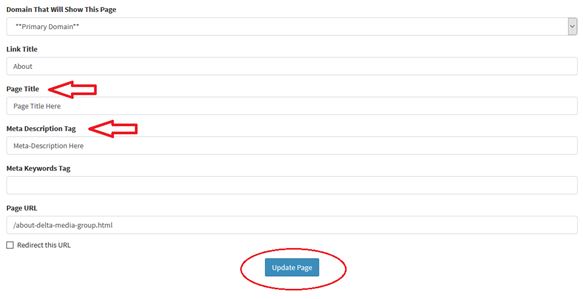
3.) Once you input all of the necessary information, simply hit 'update page' and refresh your page on the live site to see these changes implemented.
As for the meta-keyword section, you can add keywords in if you want, but the search engines do not look at this element one way or another.
Don't Forget the Homepage
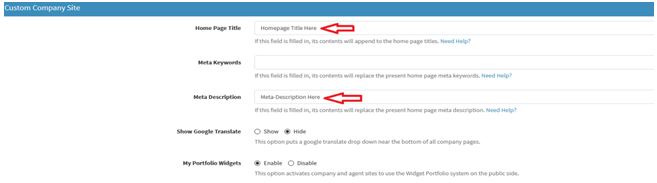
Optimizing the homepage should be high on your priority list, so do not leave this out. In order to optimize the meta-title and tags, you can do this under the 'globals' section. Follow the steps below:
Under the 'custom company site' heading, simply change the 'home page title' and the 'meta-description' fields to your preferred SEO elements, then scroll down and hit 'update preferences'. Please note that your changes will not appear right away on the live site—it takes a few hours to update.
If you have any questions, or need help setting any of this up, contact our Tech Support team. Or, get tips on how to add SEO elements to your real estate website.