
Subscribe and receive email notifications of new blog posts.
 RSS Feed
- 2026 | 68 Posts
- 2025 | 96 Posts
- 2024 | 114 Posts
- 2023 | 143 Posts
- 2022 | 188 Posts
- 2021 | 204 Posts
- 2020 | 190 Posts
- 2019 | 118 Posts
- 2018 | 122 Posts
- 2017 | 164 Posts
- 2016 | 95 Posts
- 2015 | 68 Posts
19
Using Google Analytics to Evaluate Your Online Business
Do you use Google Analytics to measure traffic to your real estate company's website?
How do you measure traffic to your real estate company's website? One of the biggest benefits of online marketing is that you'll always have the data you need to understand how your website is performing--if you know where to look. Google Analytics (GA) is a great place to start.
Google Analytics is a FREE (Yep-you read that right—FREE!) analytics tool offered by Google that allows you to measure your website's traffic, improve your site, deliver better results and convert more leads.
To really understand the benefits of Google Analytics, it's best to start from the beginning. Do you have GA installed on your website? If you do, good job! If not, get it installed and discover how beneficial GA can be to really understanding your website business.
Next, familiarize yourself with the basic reports Google offers. To give you real life examples of Google Analytics reporting capabilities, let's start with a few of the basic reports Delta Media Group uses to convey results to our digital marketing customers.
1. Audience Overview - This report provides the basics on user sessions, page views, session duration and bounce rate in addition to valuable information as to how visitors are engaging on your website. It answers the questions like: Is my site getting traffic? How long are visitors sticking around and how many pages are they looking at?
How to Run this Report: Select Date Range and compare to same time period in the previous year. Click on"Audience" > "Overview".

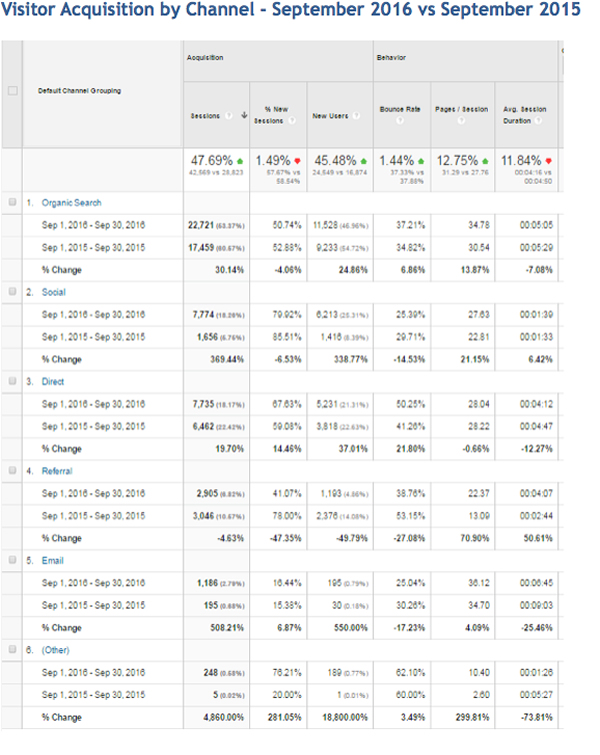
2. Visitor Acquisition by Channel – This report is used to gauge the general health of the traffic coming from direct, referral, social, email, and organic search. When possible, we like to compare a particular time period (September for example) to the previous year. We feel it provides an apples-to-apples comparison given seasonality of the real estate industry. It identifies any increases or decreases covering the same time period from the previous year. You can also determine if there are any issues with behavior and conversions.
How to Run this Report: Select Date Range and compare to same time period in the previous year. Click on"Acquisition" > "All Traffic" > "Channels".
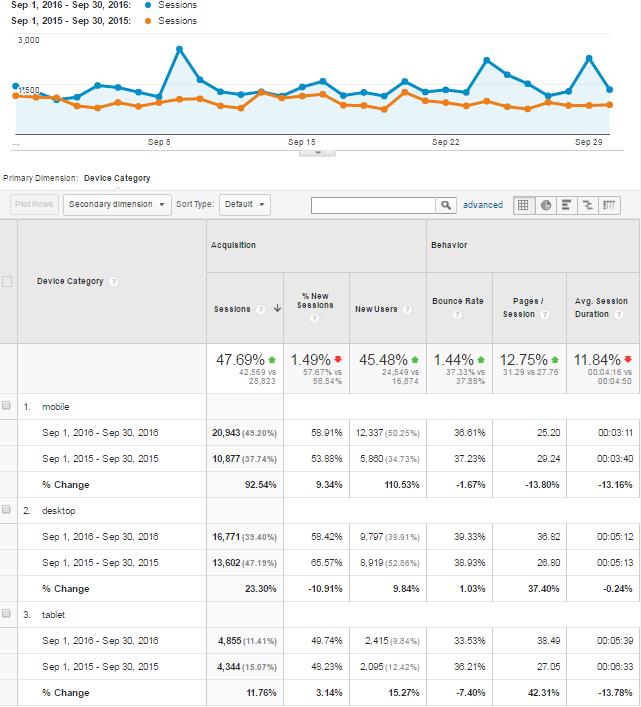
3. Audience Engagement by Device – GA allows us to understand the types of devices customers use while visiting our website. In the real estate industry, it is not uncommon to see mobile traffic at between 50 to 80 percent of total traffic. It's important to understand how visitors are interacting with your site to fully maximize conversions. For tips on how to better focus on mobile visitors, check out: Mobile Real Estate Website Trending for September 2016.
How to Run this Report: Select Date Range and compare to same time period in the previous year. Click on"Audience" > "Mobile" > "Devices".
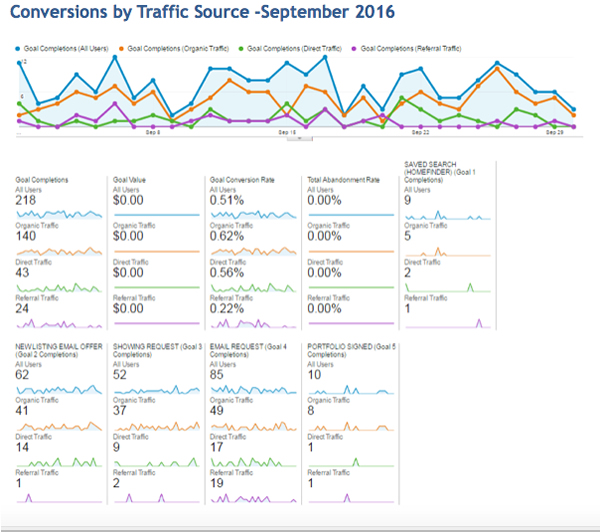
4. Goal Completions by Traffic Source -This is a bonus report for the more advanced individuals. Goals will need to be setup within GA to run this particular report. This data really helps define the ROI on your different marketing strategies.
How to Run this Report: Select Date Range (The report shown is for one month. It is possible to track month-over-month or year-over-year.) Click on "Conversions" > "Goals" > "Overview"

The next step is to segment traffic type (i.e. organic traffic, direct traffic, paid traffic). To do this you will need to scroll up to this area of the page to where it says "Add Segment."
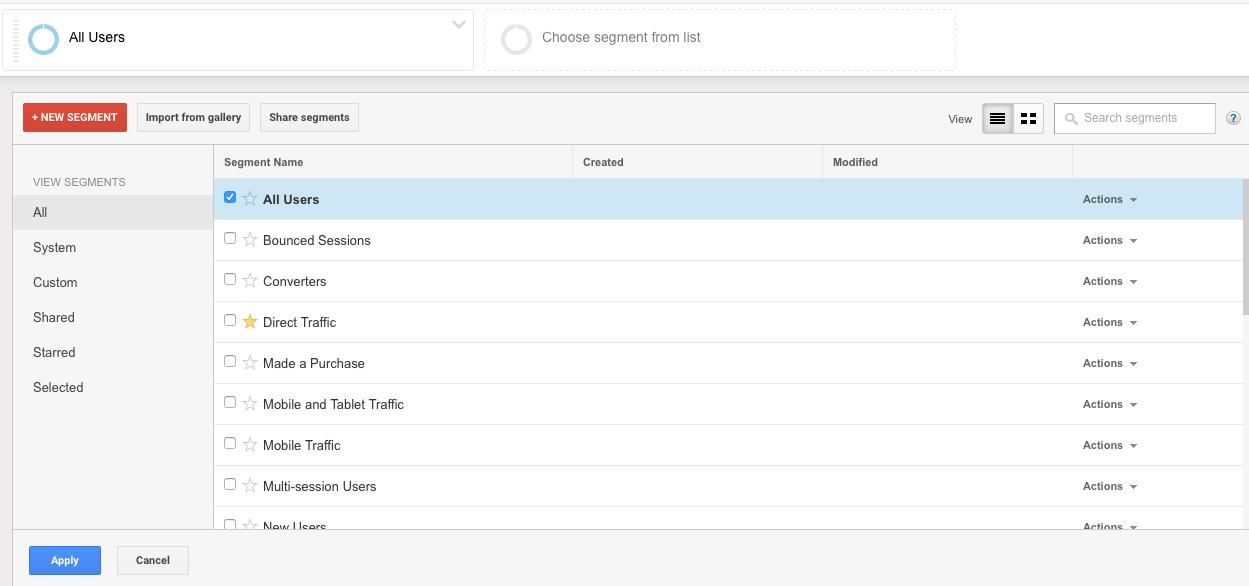
Clicking on "Add Segment" will provide a list of options for which you can click up to four different segments to evaluate. Once you selected your specific segments, click "Apply" at the bottom.
Depending upon the parameters and segments you create, you should get a report that resembles this:
If you ever wondered how many leads your site should be converting, Delta Media Group created a simple calculator to help you figure that out. All you will need is the amount of user sessions (example report #1) for a month and this link to our calculator.
As you become more familiar with Google Analytics, you'll be able to understand where your traffic originates, the amount of time customers stay on your website and even what kind of content appeals to your customers.
Contact Delta Media Group to understand the power of Google Analytics and how it can help you make your real estate business even more profitable.